

Meet TheSoftCo Pinterest Scheduler: Set It Once, Let It Pin Itself
Most people who take Pinterest seriously eventually hit the same wall: growth depends on posting consistently, but posting consistently means logging in almost every day, uploading one image at a time, writing a title and description for each one, and hoping you remembered to check the clock before hitting publish. It's not complicated work — it's just the kind of repetitive work that quietly eats an afternoon and gets skipped the moment life gets busy.
We're Introducing Pinterest Scheduler to take that daily task off your plate entirely. Instead of logging in every single day to post one pin at a time, you set up an entire campaign in one sitting — days, sometimes months of pins — and the system handles the actual publishing on its own, in the background, whether or not you're anywhere near a computer when it happens.
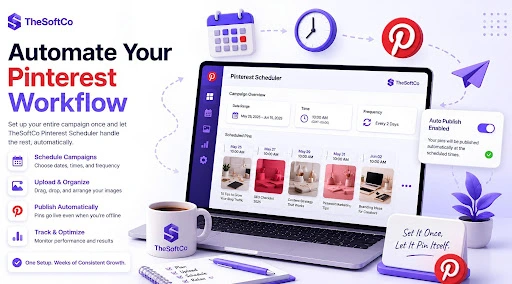
So How Does It Actually Work?
You're not automating chaos, you're automating a schedule you control from the start. (For the full step-by-step walkthrough of every setting, see our detailed how-to guide.)
You begin by connecting your real Pinterest account through Pinterest's own official API, so there's no workaround or fake login involved — just a direct, secure link between your account and the scheduler. From there, you tell it three things: your timezone, the date range you want to cover, and how often you want pins to go out — daily, every couple of days, or just on weekdays, for example. Based on that, the system automatically works out exactly how many pin "slots" that adds up to, so you already know how many images to prepare before you upload a single one.
Uploading is just as simple. You drag your images in, and the order you drop them in becomes the order they get scheduled — no manual date-matching required. Each one still gets its own title, description, and destination link, so nothing goes out generic or unfinished, and if one particular pin needs an exact date instead of whatever slot it landed in, you can override that by hand without disturbing the rest of the queue.
Once everything's set, the scheduler runs server-side — meaning it keeps working even after you've closed your laptop. Pins go out at the exact times you chose, and a simple dashboard lets you check back later to see what's published, what's still pending, and whether anything needs your attention.
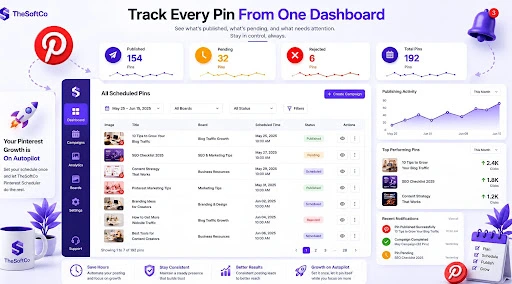
Why That Matters More Than It Sounds
The real shift isn't just "less clicking." It's that Pinterest growth stops depending on whether you remembered to log in today. A weekend spent preparing images and setting a schedule can cover an entire month of consistent posting — which is exactly the kind of consistency Pinterest tends to reward, and exactly the kind that's almost impossible to keep up manually once life gets in the way. Current plan details, including what happens after the beta period, are always up to date on the pricing page.
Free plan is available to start, with no credit card required — a good moment to get started and see whether a set-it-once approach fits your workflow better than logging in daily ever did.
Join the Conversation
Share your perspective, ask thoughtful questions, or leave constructive feedback about this article.